# How to set up Git commit signing
Have you noticed some commits on GitHub are marked as `Verified`? Do you want that fancy looking icon next to **your** GitHub commits?
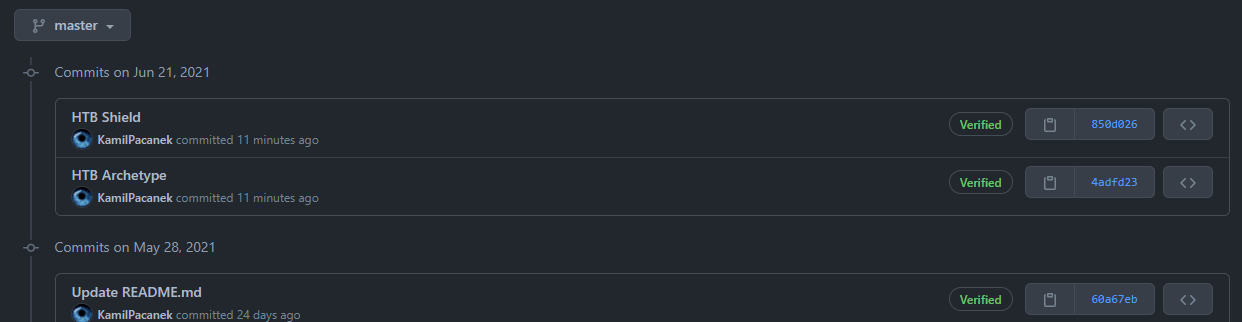
Or Git history?

Here is how!
***
# Contents
1. [Verify downloaded GPG installation package](#verify-downloaded-gpg-installation-package)
2. [Create GPG signing key](#create-gpg-signing-key)
3. [Update Git Bash to use new gpg installation](#update-git-bash-to-use-new-gpg-installation)
4. [Configure Git](#configure-git)
5. [Test Git commit signing](#test-git-commit-signing)
6. [Useful notes](#useful-notes)
***
%%[patreon-btn]
> 🔔 `CyberEthical.Me` is maintained purely from your donations - consider one-time sponsoring with the [Sponsor](/sponsor) button or 🎁 [become a Patron](https://www.patreon.com/cyberethicalme) which also gives you some bonus perks.
# Verify downloaded GPG installation package
1. Download GPG ([GPG Binary releases](https://gnupg.org/download/index.html)) **and** `*.sig` file.
* Windows: GnuPG simple installer (CLI tools)
2. Import GnuPG public keys with verified `gpg` binary.
* Use `gpg` that comes with Git installation from `Git Bash`
```sh
where gpg
gpg --version
```
* Go to [GnuPG public keys reference](https://gnupg.org/signature_key.html) page and keep it open.
* Copy public key block and save it under `*.asc` file
* Import GnuPG public keys
```sh
gpg --import gnugp.asc
```
* Verify that keys are imported. Notice they are initially untrusted.
```ssh
gpg --list-keys --keyid-format LONG
```
* Note the `key-id` that identifies key on the current environment
> pub rsa2048/**249B39D24F25E3B6** 2011-01-12 [SC] [expires: 2021-12-31]
* Verify that imported keys matches keys on the [GnuPG public keys reference page](https://gnupg.org/signature_key.html). Trust **each** key by using following command. Use ultimate trust.
```sh
gpg --edit-key {key-id} trust
```
* Verify that GnuPG keys are trusted (expired ones won't show the ultimate trust flag)
```sh
$ gpg --list-keys --keyid-format LONG
pub rsa2048/249B39D24F25E3B6 2011-01-12 [SC] [expires: 2021-12-31]
D8692123C4065DEA5E0F3AB5249B39D24F25E3B6
uid [ultimate] Werner Koch (dist sig)
pub rsa2048/2071B08A33BD3F06 2014-10-29 [SC] [expired: 2020-10-30]
031EC2536E580D8EA286A9F22071B08A33BD3F06
uid [ expired] NIIBE Yutaka (GnuPG Release Key)
pub rsa3072/BCEF7E294B092E28 2017-03-17 [SC] [expires: 2027-03-15]
5B80C5754298F0CB55D8ED6ABCEF7E294B092E28
uid [ultimate] Andre Heinecke (Release Signing Key)
pub ed25519/528897B826403ADA 2020-08-24 [SC] [expires: 2030-06-30]
6DAA6E64A76D2840571B4902528897B826403ADA
uid [ultimate] Werner Koch (dist signing 2020)
```
3. Verify installation package. Read [Integrity check](https://gnupg.org/download/integrity_check.html) by GnuPG team. If previous steps was done correctly, similar message should be displayed, otherwise refer to the aforementioned _Integrity check_.
```sh
gpg: Signature made 07-04-2021 20:06:23 Central European Daylight Time
gpg: using EDDSA key 6DAA6E64A76D2840571B4902528897B826403ADA
gpg: Good signature from "Werner Koch (dist signing 2020)" [ultimate]
```
4. Install `gpg`.
[Back to top](#contents) ⤴
## Post-install steps
1. Open Windows command prompt and configure new installation.
* Verify version and location of `gpg`
```sh
where gpg
gpg --version
```
2. If `gpg` report with language different that English set environment variable LANG=C. Restart command prompt.
3. Import GnuPG keys as described before. Ensure they are trusted.
[Back to top](#contents) ⤴
# Create GPG signing key
Create GPG key for Git signing. When key is purposed to be used on a Github [follow latest instructions](https://docs.github.com/en/github/authenticating-to-github/generating-a-new-gpg-key).
```sh
gpg --full-generate-key
```
# Update Git Bash to use new `gpg` installation
1. Validate - if Git Bash is still using its own keyring, new key should be visible only on command prompt. Run listing command in both command prompt and bash shell.
```sh
gpg --list-keys
```
2. Append path to the `gpg` in the `{SYSTEMDRIVE}/Users/{PROFILE}/.bash_profile` (create file if needed)
```sh
alias gpg="'C:\Program Files (x86)\gnupg\bin\gpg.exe'"
```
3. Restart Git Bash to apply changes.
[Back to top](#contents) ⤴
# Configure Git
1. Add following config changes globaly. Setting `commit.gpgsign` to `true` enables signing each commit by default. Without this each commit would have to be implicitly marked to be signed with `-S` flag (ex. `commit -S -m "Add new file"`)
```sh
git config --global gpg.program {PATH_TO_GPG}
git config --global user.signingkey {KEY_ID}
git config --global commit.gpgsign true
```
8. Depending on the preferences, default behaviour for annotated tags can be changed by modyfing following config.
```sh
git config --global tag.forceSignAnnotated true
```
# Test Git commit signing
1. Create temporary repository.
```cmd
mkdir test-repo
cd test-repo
git init
```
2. Add empty commit and verify that you are prompted for the GPG key passphrase.
```sh
git commit --allow-empty -m "Signed commit"
```
3. Sign can be verified using following methods.
```sh
$ git verify-commit 64796ee
gpg: Signature made 14-04-2021 10:00:09 Central European Daylight Time
gpg: using RSA key 551760C1C76669F30FEFCDAF59DCC37EB7307329
gpg: Good signature from "Kamil Gierach-Pacanek (Git signing key) <****@******.com>" [ultimate]
```
```sh
$ git show --show-signature 64796ee
commit 64796eeea6be5742828f5269a35585c98f02d3c2 (HEAD -> master)
gpg: Signature made 14-04-2021 10:00:09 Central European Daylight Time
gpg: using RSA key 551760C1C76669F30FEFCDAF59DCC37EB7307329
gpg: Good signature from "Kamil Gierach-Pacanek (Git signing key) <****@******.com>" [ultimate]
Author: Kamil Gierach-Pacanek <****@******.com>
Date: Wed Apr 14 09:59:52 2021 +0200
Signed commit
```
[Back to top](#contents) ⤴
# Useful notes
> 📌 Follow the `#CyberEthical` hashtag on the social media
> 🎁 Become a Patron and [gain additional benefits](https://www.patreon.com/cyberethicalme)
> 👉 Instagram: [@cyber.ethical.me](https://www.instagram.com/cyber.ethical.me/)
> 👉 LinkedIn: [Kamil Gierach-Pacanek](https://www.linkedin.com/in/kamilpacanek)
> 👉 Twitter: [@cyberethical_me](https://twitter.com/cyberethical_me)
> 👉 Facebook: [@CyberEthicalMe](https://facebook.com/CyberEthicalMe)
## Resetting gpg-agent
In case following error occurs during the commit phase:
```text
gpg: can't connect to the agent: IPC connect call failed
gpg: keydb_search failed: No agent running
gpg: skipped "34A91BE1A93DDAF6": No agent running
gpg: signing failed: No agent running
error: gpg failed to sign the data
fatal: failed to write commit object
```
Run the following command to reload the agents.
```sh
gpgconf --kill gpg-agent gpg-connect-agent reloadagent /bye
```
## GPG failed to sign the data

First, ensure your username and email are the same that was used for the GPG key.
```text
$ git config --get-all user.name
$ git config --get-all user.email
$ gpg -K --keyid-format SHORT
```
If so, the problem most certainly lies on the GPG itself. Try following command:
```text
$ echo "test" | gpg --clearsign
```
If error message is saying
```text
gpg: signing failed: Inappropriate ioctl for device
gpg: [stdin]: clear-sign failed: Inappropriate ioctl for device
```
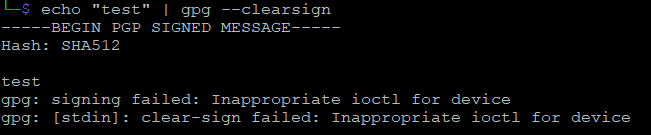
Run below command and try again:
```text
$ export GPG_TTY=$(tty)
```
> Tip about exporting GPG_TTY variable sourced from [here](https://stackoverflow.com/a/55993078/6710729)
[Back to top](#contents) ⤴